Custom business dashboards
Built in-houseJarvis was built by this house for its founder’s own businesses, not for a client. The demo below runs on invented names and numbers. The real one is private.
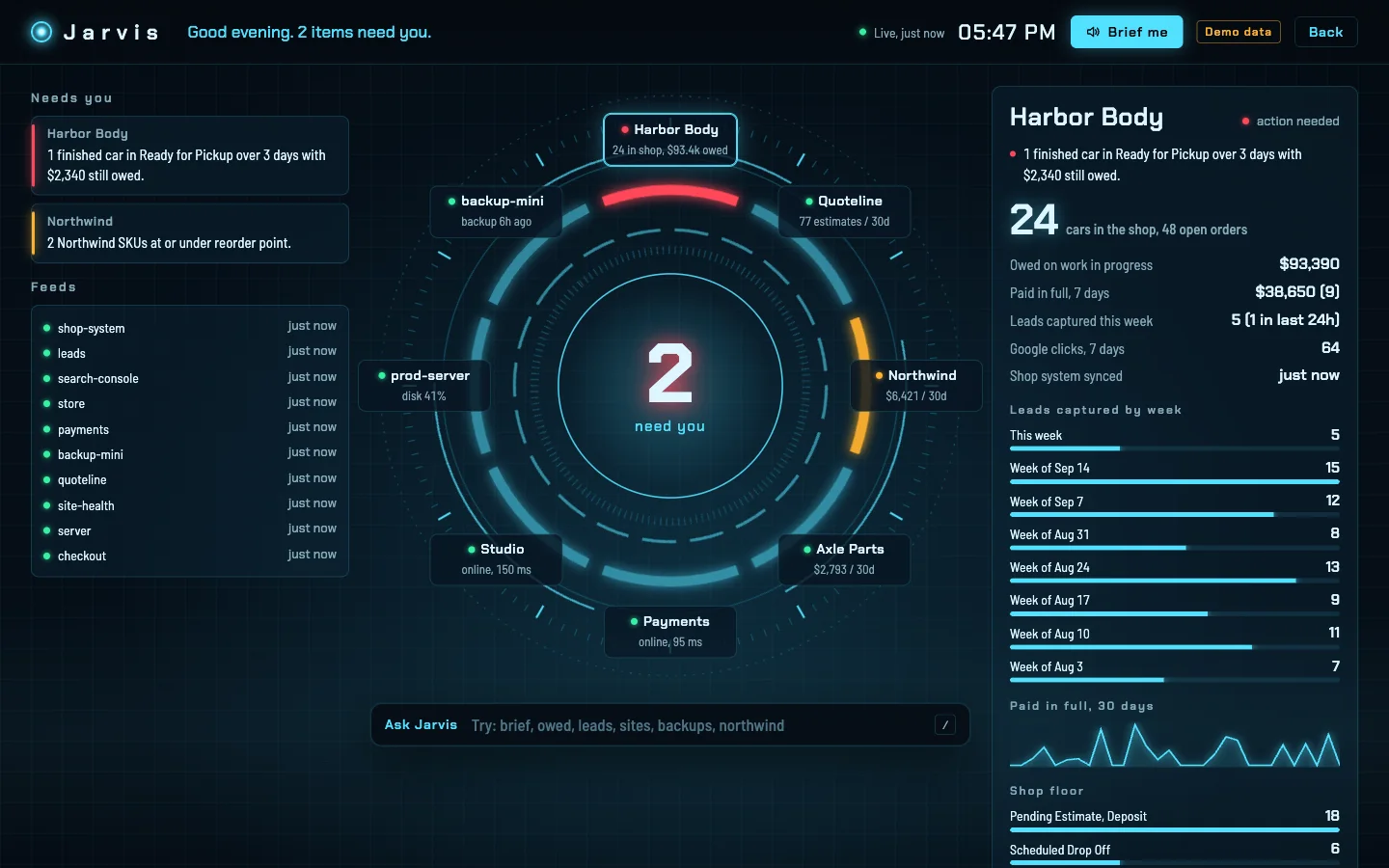
Our founder runs a collision shop, a software product, an online store and this studio at the same time. Jarvis puts all of it in one place, lights up only what needs him, and answers questions out loud. We build the same thing for owners who are tired of checking eight tabs to find out whether anything is on fire.
The problem
An owner with more than one business ends up running a daily tour: the shop system for open jobs, the bank for what was paid, Stripe for online orders, a spreadsheet for leads, the hosting panel for whether the site is up. Each check is quick. Together they eat the first hour of the day, and the one that gets skipped is the one that mattered.
Most dashboards make it worse by showing everything at the same volume. A number that is fine and a number that is costing money look identical, so after a week nobody reads either.
How Jarvis works
Measured
What this does not show
Jarvis has one user, its owner, and has been live since September 23, 2026, so there is no long-run data yet on the time it saves or the money it recovers. Its question box matches your words to its own panels; it does not use an AI model to answer, which is deliberate for now, because it means it cannot make a number up.
Last verified September 23, 2026.
Built for
Collision and auto repair shops. Jarvis started as a dashboard for a body shop owner. It reads the shop’s Shopmonkey data and shows cars by stage, money owed on work in progress, what was paid in full this week and leads captured per week, and it flags a finished car that has sat unpaid in delivery. That is the view shop management software does not give an owner who is not standing in the shop.
Owners of several businesses. A shop, an online store, a software product and a studio have nothing in common except the person responsible for all of them. One screen, one set of warning lights, one briefing.
Anyone whose numbers live in five logins. If your morning starts with a tour of tabs, the command center is the tour, done every ten minutes, by something that never skips a stop.
Yours
You walk us through what you check every day and where it lives. That list becomes the lights: what counts as fine, what counts as a problem, and who needs to know.
We connect to your systems through accounts that can only read, and prove it before anything else is built. Where a system has no way in, the panel says so rather than guessing.
Designed around your businesses, not a template. Desktop, phone, and a spoken briefing if you want one.
It runs on hardware and accounts in your name, with the source code and a written record of how it works. If we part ways tomorrow, it keeps running.
Questions
A single private screen that shows every business you own, fed live from the systems those businesses already run on. Instead of a wall of charts, it watches for the handful of things that cost money when missed, stays quiet while they are fine, and tells you in one sentence when one is not.
Those are tools for building charts yourself, and they are good at it. A command center is built for one owner’s operation: we decide with you what counts as a problem, wire it to your systems, and design the screen around the decisions you make every morning. It runs on accounts you own, not on a seat you rent.
Jarvis reads Shopmonkey, Stripe, PostgreSQL databases, Google Search Console and Linux servers today. In general anything with an API or a database can feed one. Where a system has no way in, the panel says so rather than guessing.
That is where it started. Jarvis reads a collision shop’s Shopmonkey data and shows cars by stage, money owed on work in progress, what was paid in full this week, and leads captured per week. Its first warning light is a finished car still unpaid after three days in delivery.
It reads through database accounts that can look but cannot change anything, and cannot see passwords or customer contact details at all. It is not on the public internet: it runs on your own server and opens only on your own devices over a private network.
Not to produce numbers. Its question box matches your words to its own live panels, so it cannot invent a figure, and the spoken briefing is read by your device’s built-in voice. An AI layer can be added on top, answering from the same verified figures.
Yes. It works in any browser on your devices and installs on a Mac as its own app that starts at login and reconnects by itself if the network drops.
The first version of Jarvis went from first question to live in one day, because every system it reads was already reachable. Yours depends on how many systems it reads and how easy they are to reach. You own the code, the server and every account, and it keeps running if we part ways.
Read how it was built: How we built Jarvis, a command center for every business we run.